
Fantasy AI Painting Generator: Transform Photos into Art
Have you ever looked at a photograph and imagined it as a scene from an epic fantasy world? A world of mystical forests, towering castles, and ethereal light? For many creators, turning that vision into reality requires hours of painstaking work. But what if you could do it in seconds?
Welcome to a new era of digital creativity. AI technology is changing how we create, offering powerful tools that act as a creative partner. Our AI painting generator is at the forefront of this change, providing an intuitive platform to transform your photos into stunning artworks. This guide will show you everything you need to know about using a fantasy AI painting generator to unlock new realms of imagination.
Whether you're looking to speed up your concept art workflow, find fresh inspiration, or simply create something beautiful, you’re in the right place. Let's explore how you can turn any image into a fantasy masterpiece with the AIPainting.io tool.
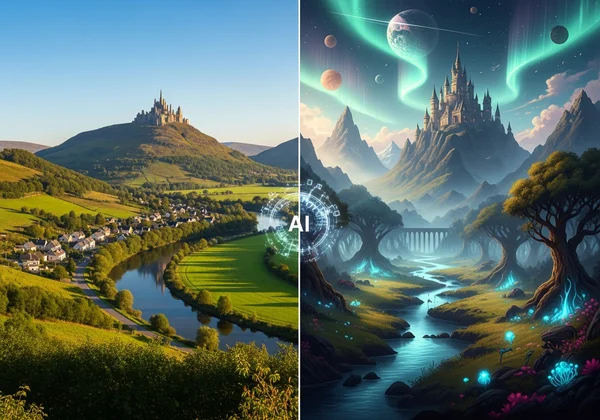
Discovering the Fantasy Art AI Generator
Creating fantasy art with artificial intelligence might sound complex, but the technology is designed to be incredibly user-friendly. It’s a tool built to augment your creativity, not replace it. Let's break down what it is and how it works.
What is AI Fantasy Art & Why Use It?
AI fantasy art is digital artwork created by an AI model trained on the fantasy genre. This includes everything from the soft, dreamlike quality of a high-fantasy landscape to the dark tones of an epic battle. The AI studies thousands of images. It picks up fantasy's key textures, colors, and layouts.
For creators, the benefits are immense:
- Speed Up Ideation: Generate dozens of visual concepts in minutes, not days. It's perfect for mood boards and initial client pitches.
- Overcome Creative Blocks: When you’re feeling uninspired, feeding a simple photo into an AI can spark countless new ideas.
- Enhance Your Workflow: Use AI-generated images as a base layer for your digital paintings, saving time on composition and color.
- Accessibility: You don't need to be a master painter to create a beautiful fantasy scene. It opens up creative expression to everyone.
How Our AI Painting Generator Creates Magic: Understanding the Process
The magic behind our AI painting generator isn't an arcane spell; it's advanced deep learning. Our platform uses sophisticated AI models that specialize in style transfer.
Upload your photo. The AI scans its shapes, subjects, and layout. Pick 'Fantasy' style. Watch it redraw everything with magical touches. It intelligently reinterprets your photo's lighting, adds fantastical textures, and shifts the color palette to evoke a sense of wonder and adventure. The process is simple: upload your image, pick a style, and let the AI handle the rest.
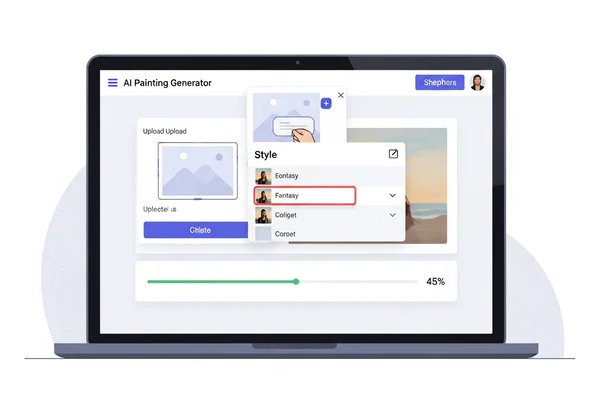
Your Step-by-Step Guide: Photo to Fantasy Painting
Transforming your photos is a straightforward and rewarding process. With our tool, you can go from a standard photograph to a work of fantasy art in just three simple steps. Let's walk through the journey.
Uploading Your Vision: Selecting the Right Source Image
The foundation of a great AI painting is a great source image. While the AI is powerful, your input quality directly influences the output. For the best results, choose a photo that's clear, well-lit, and has a defined subject.
Landscapes with dramatic skies, portraits with interesting lighting, or even architectural photos of old buildings make excellent candidates. Don’t be afraid to experiment! Sometimes the most unexpected photos yield the most magical results. Our platform supports common formats like JPG, PNG, and WEBP, so you can easily try our free tool with images from your phone or camera.
Choosing Your Epic Style: Exploring Fantasy Art Options
Once your image is uploaded, the creative fun begins. Our platform offers a curated library of artistic styles, including a dedicated "Fantasy" option. This style is specifically trained to infuse your images with elements of magic and mythology.
Selecting the fantasy style will apply a unique filter that can transform a simple forest into an enchanted wood, or a cloudy sky into a celestial expanse. This is your chance to play art director. Browse the available styles and choose the one that best matches the story you want to tell.
Generating & Refining Your Masterpiece with Our Tool
With your image uploaded and style selected, you're ready to create. Just click the "Generate" button. In seconds, our AI will process your request and present you with a brand-new piece of art.
Slide between before-and-after to spot every magical change. You can also adjust the aspect ratio (1:1 for social media, 16:9 for wallpapers) to fit your project's needs. Once you're happy with your creation, download it and share it with the world.
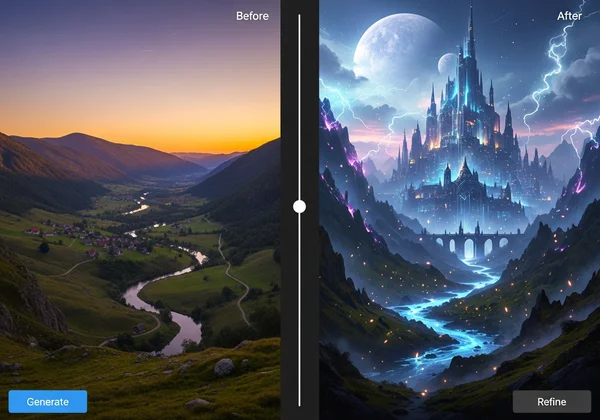
Mastering the AI Painting Fantasy Style for Stunning Results
Generating an image is just the beginning. With a few expert tips, you can elevate your creations from interesting to truly breathtaking. Mastering the AI painting fantasy style is about understanding how to guide the AI to produce your desired outcome.
Pro Tips for Source Photos: From Ordinary to Extraordinary
To get the most out of the AI, think like an artist when choosing your photo.
- High Contrast is Key: Images with strong light and shadow often produce more dramatic and visually compelling fantasy art.
- Focus on a Clear Subject: A photo with a distinct focal point—like a person, an animal, or a building—helps the AI apply the style with more precision.
- Consider the Composition: Photos that follow classic rules of composition (like the rule of thirds) tend to translate into more balanced and aesthetically pleasing artworks.
- Experiment with Black and White: Uploading a monochrome image can lead to surprising results, as the AI focuses purely on form and texture when applying the fantasy colors.
Customizing Your Fantasy Transformation: Settings & Adjustments
While our tool prioritizes a simple one-click process, your choices still matter. The primary way to customize your output is through style selection and image preparation. Trying the same photo with different styles, like "Oil Painting" or "Ghibli," can produce a completely different fantasy feel. Cropping your source image to focus on a specific detail before uploading can also dramatically change the final composition.
Enhancing Your AI-Generated Art: Beyond the Initial Output
For professional digital artists and illustrators, the AI-generated image is often a powerful starting point. Think of it as an advanced base layer or a concept sketch. You can import your fantasy art into software like Adobe Photoshop, Procreate, or Clip Studio Paint.
From there, your options are limitless. Paint over certain areas to add your personal touch, adjust the colors to fit a specific palette, or composite multiple AI creations together to build a complex scene. This hybrid workflow combines the speed of AI with the nuance of human creativity.
Unleash Creativity: Turn Photo into Fantasy Art for Every Project
The ability to turn photo into fantasy art is more than just a novelty; it’s a practical tool with endless applications for both professional and personal projects. Here’s how you can integrate it into your creative life.
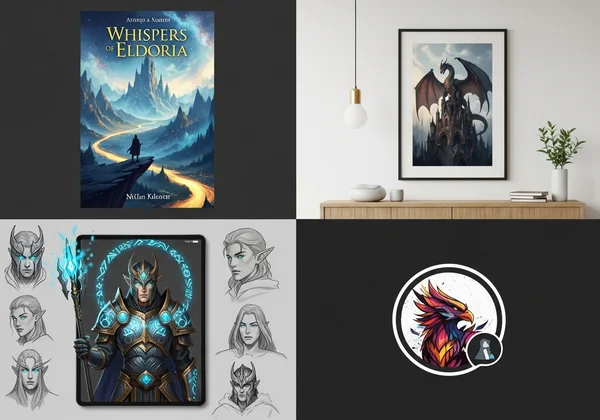
Fantasy Art for Digital Artists & Illustrators: Workflow Integration
If you're a digital artist like "Sophia," time and inspiration are your most valuable resources. An AI painting generator can become an indispensable part of your toolkit.
- Concept Art: Quickly generate environments, character portraits, and keyframes for game or film projects.
- Book Covers: Create dozens of cover concepts from a single source image to find the perfect visual for a fantasy novel.
- Inspiration Source: Use the generated art as a "mood board" to define the visual direction for a larger project.
By automating the initial stages of creation, you can spend more time on the details and polish that make your work unique. Start exploring these possibilities today with our online painting generator.
Elevating Personal Projects & Decor: Unique Creations
You don’t have to be a professional to enjoy the magic of AI art. For enthusiasts like "Alex," it's a fun and accessible way to bring a creative touch to everyday life.
- Custom Wall Art: Turn your favorite vacation photos into epic fantasy landscapes to print and hang in your home.
- Unique Gifts: Create personalized fantasy portraits of friends, family, or pets for a truly one-of-a-kind present.
- Social Media Profiles: Design a striking and memorable profile picture that stands out from the crowd.
- Personalized Stationery: Use your AI creations to design custom greeting cards, invitations, or phone wallpapers.
Your Portal to Fantasy Art Awaits
The world of fantasy is built on imagination, and AI is now giving us a powerful new key to unlock it. With a tool like our AI painting generator, the ability to transform ordinary photos into extraordinary works of art is accessible to everyone. Now that you've seen how it works, tried the steps, and grabbed those pro tips, it's your turn to play.
Whether you're a professional artist seeking to streamline your workflow or a hobbyist looking for a new creative outlet, the potential is limitless. Your vision, powered by AI, can bring mythical worlds to life.
Ready to begin your adventure? Your portal to fantasy is open. Generate your art and see what incredible masterpieces you can create today!
The Takeaway
What is AI Fantasy Painting?
AI Fantasy Painting is a process where artificial intelligence transforms a regular photograph into a new image that mimics the style and themes of fantasy art. This is achieved using AI models trained on vast datasets of fantasy illustrations and paintings to learn their unique characteristics, such as magical lighting, ethereal colors, and epic compositions.
How Does AI Turn Photos into Fantasy Art?
An AI uses a technique called "style transfer." It analyzes the content of your uploaded photo (the objects, people, and layout) and the style of the target genre (fantasy art). It then intelligently redraws your photo's content using the artistic elements—like brushstrokes, color palettes, and textures—from the fantasy style, effectively merging the two.
What is the best AI to generate fantasy art from photos?
It depends on what you need, but if speed and ease are key—like for quick concepts—our AI painting generator nails it every time. Our platform is specifically optimized to produce beautiful artistic transformations with a single click, making it ideal for both beginners and professionals who want to quickly generate creative concepts.
Can I use AI Fantasy Art for commercial projects?
Generally, yes, but it's crucial to ensure you have the rights to the original photograph you're using. To avoid copyright issues, always use your own photos or images that are in the public domain. We also recommend reviewing the terms of service of any AI tool you use to understand the specific usage rights for the generated images.
What kind of photos work best for AI fantasy transformations?
Photos with clear subjects and good lighting work best. Landscapes, portraits, and architectural shots are fantastic starting points. High-contrast images often produce more dramatic results, while photos with simpler backgrounds allow the AI to focus more effectively on transforming the main subject into a work of fantasy art.